Many of us often hear the terms Frontend and Backend in a tech jargon, but what actually are they, why are the important? Let me first walk you through a real world example, as always!
Let’s take Humans for a while. How do we describe someone? We either talk about their height, weight, color, eyes, hair or any other physical features which people can see. On the other hand intellect, aptitude, memory and internal parameters are taken into consideration.
So this boils down into two parts:
- What people can see directly.
- Your internal qualities. Exactly the same way:
- Frontend is what we can see: interface, design etc. of a software/system/website. In precise, client-side part of an application that users interact with.
- Backend is what we determine: the processing and the background stuff. In precise, server side part where the logic is there.
A car can have different dimensions, finish, color and a whole variety of physical features while the other part: engine and other sub systems complete the vehicle. In a similar manner, any project, software or most websites need to have a visible and interactable segment along with the processing system working in the background. This completes the loop and complement one another. A chassis/ body cannot function without a brain/engine, vise-versa is also true.
Frontend
Now, you already know what stays in frontend. Almost everything you are able to see on a computer screen and interact with it directly is frontend. How is frontend constructed? Get back to the human body. We have:
- Skeleton: Providing structure and integrity
- Muscles: The ability to move and operate
- Skin and features: Distinction and materialistic features. HTML, JavaScript, CSS does the same.
HTML provides the structure for the website. Sections, header, footer everything of a rigid structure. JavaScript provides the ability to use this structure. Buttons, dropdowns etc. to use the structure provided by HTML and interact with it. CSS provides the colors, gradients and cosmetic effects to the elements made in the previous steps.
Modern webpages use this modest stack for operations. We see the cosmetic features first, muscles or mobility features next and skeleton the last, be it a human body or webpage.
HTML
Hyper Text Marking Language provides structure for a webpage and it’s content. It acts as a skeleton or a chassis. A human and a dog have different skeletons, so will two different cars with their chassis. HTML gives you the flexibility to design the structure as per the requirements.
- The basic structure of HTML: starts with and with elements like
<html>,<body>,<head>,<footer>etc. They are used to specify the type of information in the webpage. - Headings:
<h1> to <h6> - Paragraphs:
<p>
JavaScript(JS)
Often there is a confusion in between Java (a popular programming language) and JavaScript. But they both serve vastly different purposes. JavaScript is the modern standard for webpages and interaction. It enables the ability to work with the structure provided by HTML. This is an interesting language because it can run in client-side (frontend) and server side (backend) also, with the help of a few frameworks.
JavaScript(JS) has major segments like:
- React.js for frontend (JavaScript library for building user interfaces)
- Node.js for backend (JavaScript runtime to manage the logic) along with another few too. JavaScript brings the intractability, without which, the webpage is just a fancy layout.
You explore, what benefits or advantages JS has over other alternatives and why is it industry standard.
CSS
Cascading Style Sheets is used to display the structure and presentation of the webpage you make. CSS properties define the visual style, layout of HTML elements. Examples of such properties are: Functionality:
- Color Properties:
color,background-color - Font Properties:
font-family,font-size,font-weight - Layout Properties:
width,height,margin,padding - Text Properties:
text-align,text-decoration,line-height
Now you’re looking at a blue gradient button on a website, clicking which will lead to an action. HTML gives you the button, CSS gives you the color and most importantly JavaScript will make that button usable i.e. assigning an action to the button.
This is a basic overview on what frontend is and the constituent elements. The objective is not to cover HTML,CSS or JS in detail and make another tutorial here but to give the basic overview of the constituent pillars of frontend.
The best part about this architecture is:
- You either can have a single
.htmlfile for your webpage in which these codes of HTML, JS and CSS are written and stored, this can be considered for smaller projects or webpages. You have to define characteristics of each button, it’s color, size and what it does in a single file. - You absolutely can have a combination of files like
index.html,styles.css,script.jsin which you can individually mention about a button or it’s elements and then about the styles and what they does and everything is defined by their name.
All three can be placed in a single HTML file using HTML elements,
Backend
This is the interesting part. We all use EMAIL, when we compose a mail, add the recipients and click on send button, this all is the part of frontend. But when you click on the send button, how does your text in the email appear in the inbox of your recipient within no time?
As the name suggests, backend is all about the background stuff.
The login form and interaction is taken care by the frontend; the backend receives the credentials, verifies them, and determines what the user is allowed to access.. For example you have a free account on a software, why don’t it magically turn into a PRO account on your next login? Backend answers all these questions.
Backend majorly comprises of :
- Database
- Authentication
- APIs and many more parts which complete an application.
Database
A database is where all the information of user/actions/services is stored in. Databases are majorly of two types:
- Relational (SQL): MySQL, PostgreSQL etc. - RDBMS uses tables and similar structuring to store the information
- Non-Relational(No-SQL): MongoDB etc. - uses the non standard method of JSON or BSON etc.
Authentication
This is the process of verifying a user’s identity. It involves checking credentials like usernames and passwords stored in the database. After authentication, the system can determine what the user is allowed to access. This latter process is called authorization.
APIs (Application Programming Interfaces)
APIs allow different software systems to communicate with each other through defined interfaces. They also define how data should be exchanged between frontend and backend.
We have discussed about frontend and backend distinctly but barely will they work without the other one, hence it is important to know how they work in real time.
Frontend is often addressed as Client-side and backend as Server Side. There are several services that allow you to host frontend and backend or only any one. If the service is massive, you can write custom backend server logic and host it on service like Amazon AWS and Google cloud or such platforms.
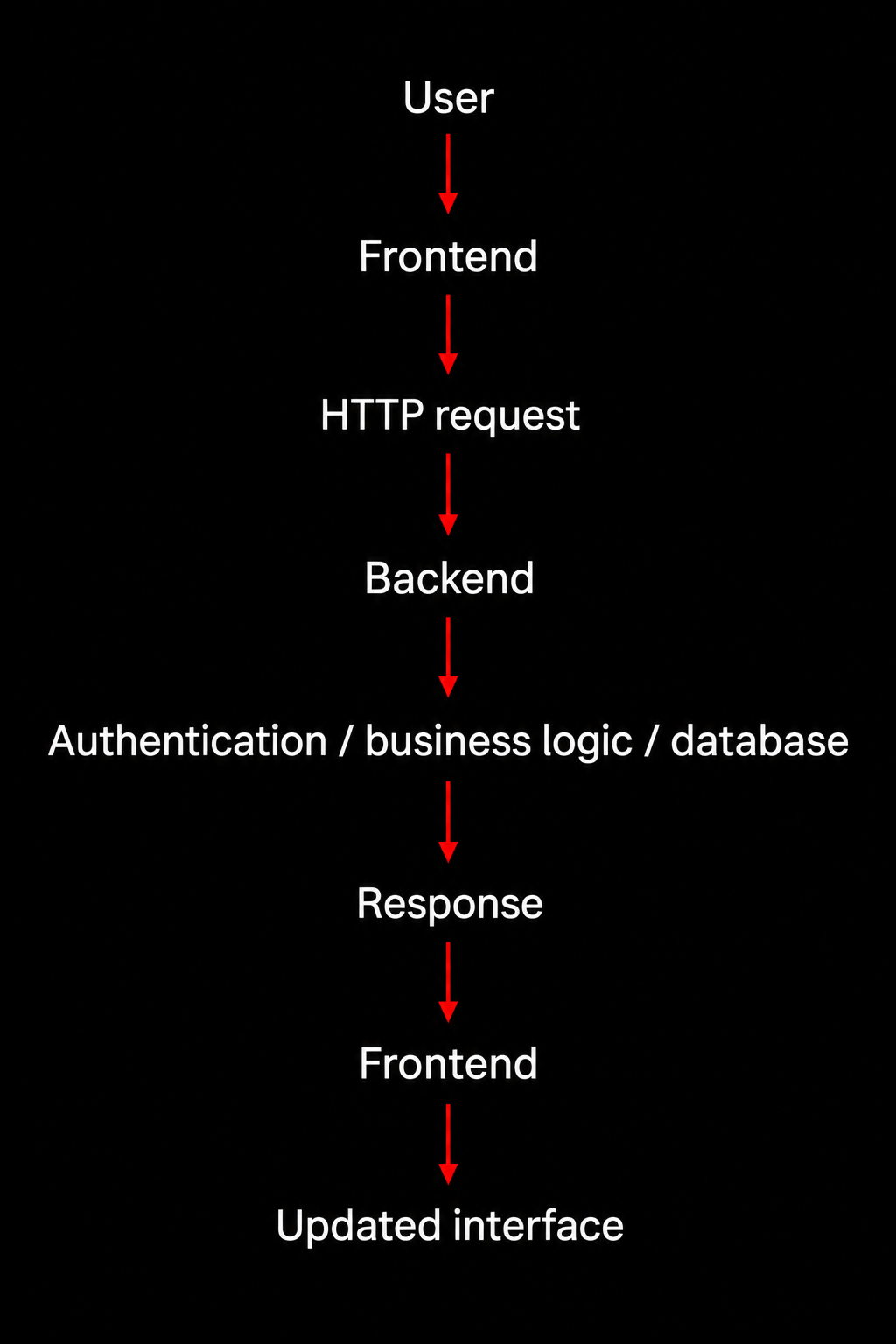
Whenever an interaction occurs in the client side, the frontend sends the request to the backend through anF HTTP request and backend processes this request and sends the response to the front end in some format( JSON is such popular format (JavaScript object notation) it’s a popular data format that simplifies data exchange and its simplicity and readability make it an preferred choice for representing data in both client-side and server-side applications. ) and the information is dynamically updated on the frontend without reloading. CSS styles are applied to make the updated content visually appealing.
Conclusion
The frontend is not the “whole application.” It is one part of a larger system. The backend is another part, and they communicate through defined interfaces and network protocols.
In coming articles, I will try to explore deep in the HTTP requests, JSON formatting and other processes involving these servers, which completes the system.
External References
[No external references are logged for this article.]
Connected Articles
[No direct links established yet.]
To visualize the entire architecture, open the Neural Map.